

Public Sector
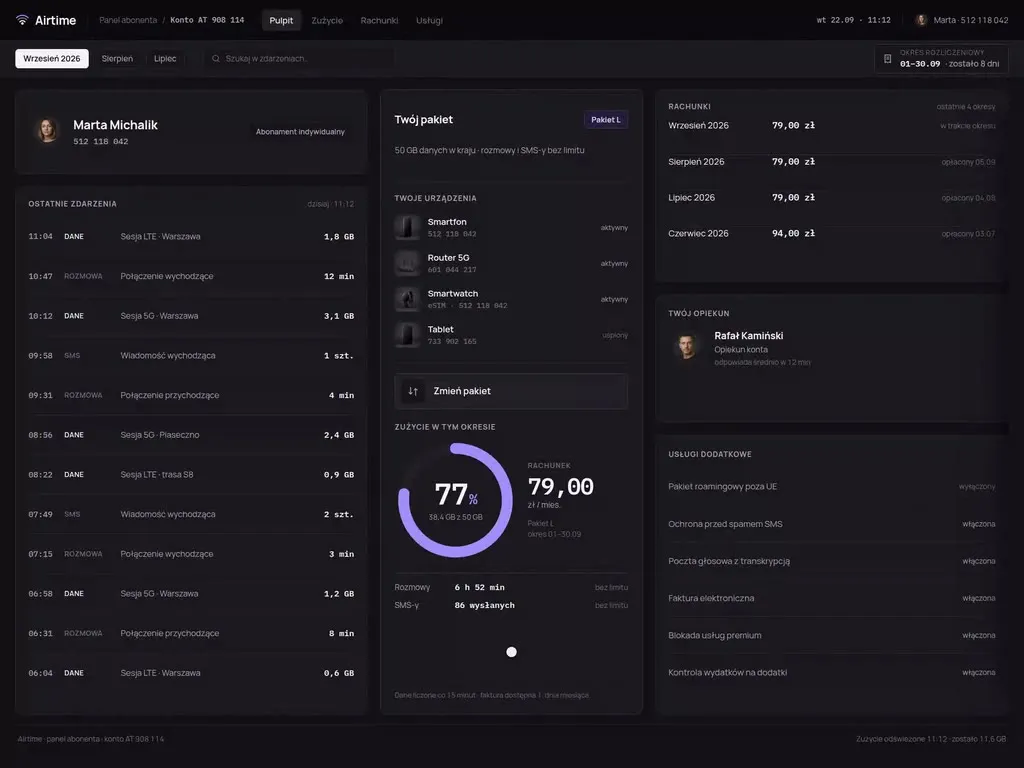
At Wzór UX agency you receive an interactive design of your public sector software, be it an e-service portal, an electronic records management system (EZD) for official correspondence or a public office domain system, and either our team or your own developers can then build it. That is how Wicket came about, an e-service portal in which a resident fills in an application for a certificate with data from her profile and, once it is sent, sees each stage of the case up to the official proof of receipt.







Challenges
What challenges do we help solve in the public sector?
Our approach
We write the questions of an e-service application the way a resident would describe their own matter, and we explain any official term the application cannot do without right next to it. A resident who understands the question has no reason to take it to the counter.
Scope of services
Our approach
On the case officer workstations in the EZD systems we design, the case queue is ordered by the deadline for settling each case, with the number of days left next to every case. A case close to its deadline rises to the top of the list on its own, so the spreadsheet kept beside the system is no longer needed.
Scope of services
Our approach
We design reporting apps so that after sending, residents see next to their report who is handling it and what stage it has reached, and a department employee changes that stage with one move from their panel. A notification then answers what residents phone about today.
Scope of services
Who it is for
Which public sector companies and institutions do we design software for?
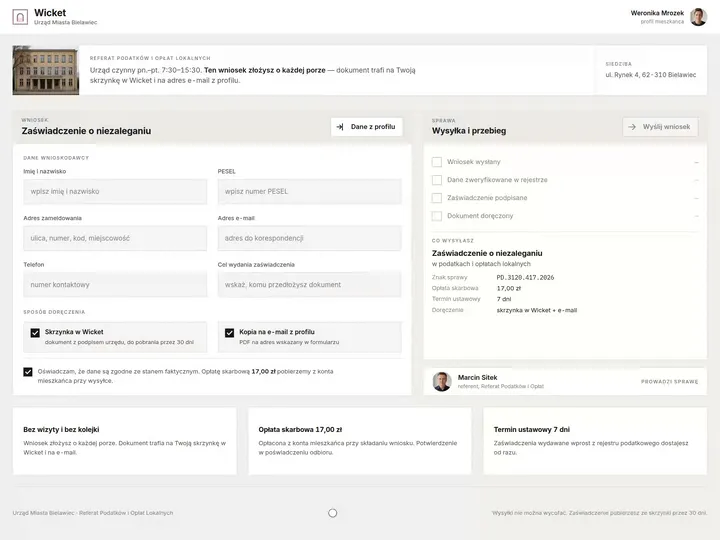
E-service portals and online applications
Municipal and city offices, district authorities and central government offices publish online applications that residents fill in on their own, with no official beside them to ask. We draw the first version of such an application for the phone screen, and an attachment can be added straight from the camera as a picture of the document.
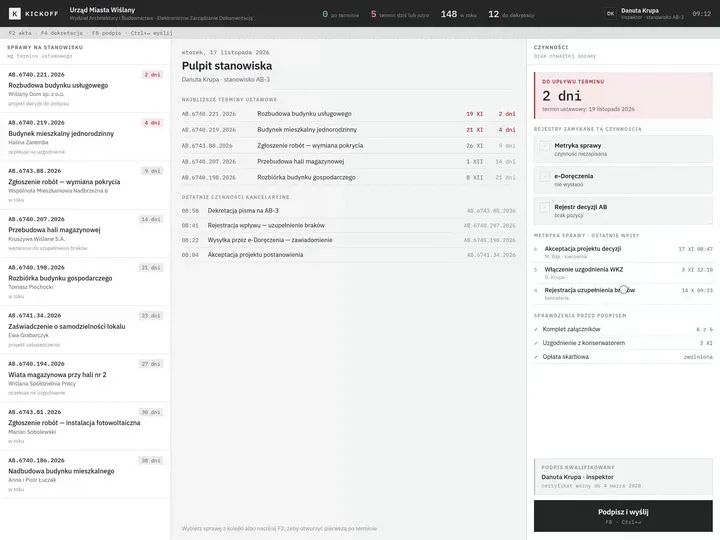
EZD systems and official correspondence
In municipal, city and district offices that work in an EZD records management system, the registry office logs incoming and outgoing items in it, and a case officer receives a case there by assignment and takes it through to approval and signature. On the case officer's workstation we put the file, the draft letter and the pre-signature checks side by side, so that signing does not mean a trip through further tabs.
Domain systems of public offices
A tax officer or a registry clerk works in a domain system every day: they assess taxes there, keep the register and prepare certificates. We plan a new e-service or officer screen from the path the data takes, so that what a resident entered in the application reaches the domain system without being retyped.
City apps and residents' reports
Cities run apps and websites in which residents report a fault or a problem in public space, and contact centre staff take the report in and pass it on to be dealt with. We lead the resident through a report from a photo and a point on the map, because these tell the department at once what needs fixing and where.
Participatory budgeting and public consultation
In participatory budgeting, residents submit projects, collect signatures of support for them and each year decide by direct vote on part of the municipality's spending, while officials assess the projects by the rules set in a resolution of the municipal council. We design the submission forms so that after a new resolution the office changes their requirements itself, such as the number of supporting signatures, without ordering a new form.

Why us?
Why choose our UX agency?
-
Fewer applications sent back for completion
A request to complete an application means a second piece of work on the same case for the case officer, and another letter and another visit for the resident. The form shows a missing attachment or an empty required field before sending, not in a letter sent afterwards.
-
Faster onboarding for new case officers
When the next step of a case is visible on screen without instructions, a new case officer starts handling cases alone sooner. Experienced colleagues and IT then get fewer questions about what to click next.
-
Accessibility before a demand, not after it
Anyone may demand that a public body ensure the digital accessibility of a website, an app or an element of them. The body does so without undue delay and no later than 7 days after the demand, and if it cannot, it informs the person who made the demand of the reasons for the delay and of a date no later than two months after the demand. A form designed to the accessibility criteria from the start is less often sent back for fixing under that procedure.
-
A senior team
A team of senior UX designers who have been designing interfaces for nine years, today for large organisations, SaaS companies and software houses. Seniors will take on your e-service portal or domain system, from early research to sign-off.
-
Proven client trust
We have designed for 115 brands, and most of them come back to us with their next project.
-
Higher quality with AI
A designer with AI tools checks more variants of an application form or a case officer's workstation than they could draw by hand and picks the one that works. What reaches you is a tested version, not the first one that came out.
Process
How will we design your public sector software, step by step?
-
A conversation with your team

We agree which case we start with and how we will measure the change
At the first meeting we sit down with the secretary or head of department, the head of the section, the registry office, IT and the person responsible for accessibility. Each of them knows a different stretch of a resident's path through the institution, so only together do we choose the starting point and the measure that will show after launch whether the change worked.
Key steps
- Conversations with the secretary or head of department, the section, the registry office, IT and the accessibility contact
- A review of the systems: e-service portal, EZD, domain systems, ePUAP and e-Doręczenia
- Choosing the case we start with
- Agreeing the measures: counter visits about matters available online, requests to complete applications, time from an incoming letter to dispatch
Deliverables
- Project brief
- Map of systems and their owners
- List of measures
- Scope of the first stage
-
Discovery in the office and with residents
We study the work at the counter, in the registry office and at the case officer's desk
We carry out discovery where the case actually moves: at the counter in the customer hall, in the registry office at its busiest hours, at the case officer's desk and with residents at home, including older people and screen reader users. We note every workaround, because it shows what the system does not provide: a printout of the form filed in a paper folder, a notebook of application numbers at the counter, an email to a resident asking for a missing document.
Key steps
- A shift at the counter in the customer hall
- Observing the work of the registry office and case officers
- Interviews with residents at home, with their consent
- A review of letters requesting completion of applications
Deliverables
- Research report
- Case map showing the workarounds
- Prioritised list of problems
-
Interactive system design
A design tested on tasks from the office's real cases
We design the screens straight for the devices they will be used on: a resident's phone and computer and a workstation in the office. We test the prototype on tasks taken from everyday casework, for example the application most often sent back for completion, and whatever makes people stop we change while it is still a prototype.
Key steps
- Screen architecture by role: resident, registry office, case officer, head of section
- Interactive design for the target devices
- Exception states: a missing attachment, an application after the deadline, a case passed to another department
- Prototype tests with residents and case officers
Deliverables
- Interactive design of every screen
- Component library
- Description of behaviour in exceptions
- Prototype and accessibility test report
-
Build or design hand-off
We connect the new screens to the systems the office already has
The build is carried out by our team, your developers or the system vendor, and we spell out for them how the new screens connect: to EZD, to ePUAP and e-Doręczenia, to login through login.gov.pl and to the domain system. We place the launch outside the busiest weeks of the year, like the run-up to the local tax payment deadline or the participatory budget call for projects.
Key steps
- Screen and field specification for developers
- Integration map: EZD, ePUAP, e-Doręczenia, login.gov.pl, domain system
- Support for the implementation team
- Accessibility and device tests before launch
Deliverables
- A working system or a package ready to build
- Integration specification
- Pre-launch test report
-
Measuring after the first months
We check against the office's data whether the change worked
After the first months we compare the measures agreed at the first meeting with the measurement taken before the change. We discuss the results with case officers and the registry office, and order the fixes by how much they will relieve the office.
Key steps
- Measuring against the stage 01 measures
- Conversations with case officers and residents after launch
- A review of tickets raised with IT
- Plan of fixes
Deliverables
- Measurement report
- Prioritised list of fixes
- System development plan
Methods and technologies
Systems and standards we work with in the public sector
-
EZD RP
EZD RP is a free electronic records management system that the Ministry of Digital Affairs, together with NASK and COI, rolls out in central and local government units, integrated with ePUAP and e-Doręczenia. When an office works in EZD RP, we design new screens so that the reference in the sending confirmation is the same one the case officer handles the case under.
-
ePUAP
Public administration bodies submit templates of electronic documents to the central repository kept within ePUAP, Poland's national e-services platform, and publish them in the Public Information Bulletin. We lay out forms based on such templates in the order of their fields, so an officer reads each form's fields in the same order as those of an application filed through ePUAP.
-
e-Doręczenia
A public body must have an address for electronic delivery, and it delivers correspondence that requires confirmation of dispatch or receipt through e-Doręczenia, Poland's public registered electronic delivery service, to the addressee's address entered in the database of electronic addresses, with the exceptions listed in the act. Before sending, we show which address the office's reply will go to and where to collect it.
-
login.gov.pl
Logging in to an office system that provides online services requires an electronic identification means from a scheme connected to the national node or from a notified scheme, or data from a qualified signature certificate, and the state identification scheme issues the trusted profile, the personal profile and the mObywatel profile. We make sure that someone who leaves halfway through a form to log in comes back to the same field with the data already entered.
-
Trusted signature
Electronic data, such as an application, bearing a trusted signature are equivalent in legal effect to a document with a handwritten signature, unless separate provisions state otherwise. We put the signing step at the end, with a preview of the whole letter being signed.
-
EN 301 549
The Polish digital accessibility act treats its requirements as met when a public body ensures accessibility taking into account clauses 9, 10 and 11 of the Polish Standard adopting ETSI EN 301 549 V3.2.1:2021, and it counts files among the elements of a website. Files such as a letter template to download are therefore checked together with the website, not after its acceptance.
Selected work
Our work for the public sector
The projects in this section are a news portal about city affairs, from the media sector, and a guide for residents on how to influence their city, both for a non-governmental organisation.
-
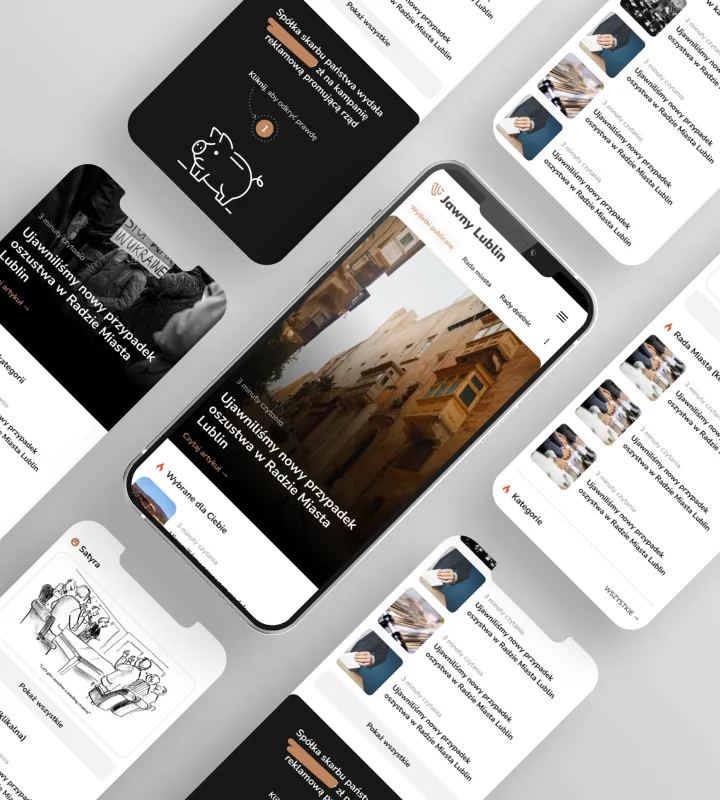
Media
Jawny Lublin
Read case studyWe designed and built one of the genuinely politically independent news portals in Lublin.
-
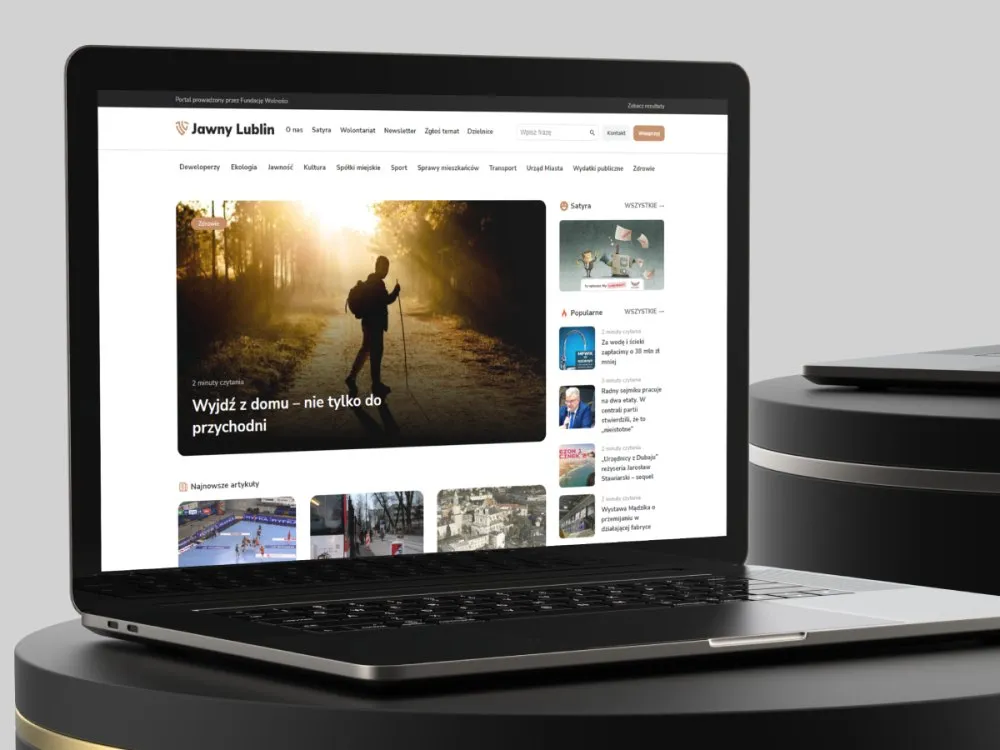
Media
Jawny Lublin
View projectThe Jawny Lublin portal, run by the Fundacja Wolności foundation - a news service covering city affairs: public spending, property developers, municipal companies, transport, ecology and satire. A clear article hierarchy, districts and categories, and a way to submit topics. Desktop and mobile.
-

Fundacja Wolności
A guidebook: how to shape the city
- See what else we build Projects
Start your public sector software project
An e-service portal, an EZD system and a domain system in one team, from research in the office to the build.

Client voices
What our clients say
 Krzysztof Jakubowski President of the Board, Jawny Lublin

“Working on our portal's brand was not the first project UX Agency Wzór delivered for us. We have been working with them for years and we do not intend to change that. Our projects always arrive on time, communication is flawless, and we hold their advice and the quality of their work in very high regard.”
 Maja Wieloch-Silecka Operations Director, Bosfor Group

“Working with the Wzór team was a genuinely great experience! They always answered our questions quickly and were flexible about our comments. They have no shortage of creative ideas and are at the same time thoroughly reliable and on time. The end result fully met our expectations; we recommend them to anyone looking for professionals who care.”
 Piotr Alberski Chief Operating Officer, Agencja XO Media

“Our clients expect us to act fast and effectively across a very wide scope - from building a brand, through a website with a store, to running an effective sales campaign. Not an easy task, but doable when you have a tight-knit team and partners who take on challenges on the fly. For us, quality, accountability and commitment are key, and working with UX Agency Wzór gives us that 100%.”


























The team
Who will design your public sector software?
-

Katarzyna Adamczuk
Prezes, Analityk Biznesowy
View profileHow can I help you?
“I will go through the regulations that set a case's deadlines and required documents, and turn them into screen requirements.”
-
Patryk Korycki
CEO, Analityk Biznesowy
View profileHow can I help you?
“I will agree the scope and budget of the first stage with you and be your contact at Wzór from the first conversation to sign-off.”
-

Tadek Wadas
Senior UX/UI Designer
View profileHow can I help you?
“I will run the prototype tests and send you a report after each day of testing, rather than holding the findings until the research ends.”
-

Aleksandra Bondar
Senior UX/UI Designer
View profileHow can I help you?
“I will design the screens starting with the case we choose together at the outset, and then extend them to the office's other cases.”
FAQ
Frequently asked questions about public sector software
What is an EZD system?
An EZD system is an ICT system for electronic records management in which registry tasks are carried out, the handling of cases is documented, and electronic documents are collected and created. This is how it is defined by the office instructions regulation for municipal, district and regional government bodies, bodies of the combined government administration in a region and the offices that serve them. Registry staff, case officers and heads of units work in it; residents do not see it, although where an office uses EZD, their letters are handled in it.
Who decides that an office moves to EZD?
In municipal, district and regional offices and in voivodeship offices, the decision to move to EZD lies with the head of the body, for example a mayor or a district head: they indicate whether the paper-based system or the EZD system is the primary way of documenting cases. Once EZD has been indicated, going back to the paper-based system is not allowed, and the head sets out exceptions by classes of the file list, together with the system they will be kept in. Before EZD is indicated, we go through cases from the classes meant to stay as exceptions on a prototype, together with the people who register incoming mail, to see what keeps them outside the system.
What is a domain system?
A domain system is a program that handles one area of an office's work, for example local taxes and fees, the population register or the business register. What people see of it is usually only the result, such as a tax decision.
Will ePUAP stop working?
Correspondence collected in ePUAP remains available for viewing, copying and deleting until 30 September 2029, and after that date the minister responsible for digital affairs deletes user accounts and electronic inboxes, together with their contents, from ePUAP. Until the same day, delivery between two public bodies that have inboxes in ePUAP has the same legal effect as delivery through e-Doręczenia.
Since when have public offices used e-Doręczenia?
Local government units and their unions, metropolitan unions, local government cultural institutions, legal persons and budgetary establishments have applied the rules on e-Doręczenia since 1 January 2025, and they will apply the rules on the public hybrid service, a postal service of the designated operator, from 1 October 2029. The same date of 1 January 2025 applies to the remaining public entities with no other date in the act, while courts, tribunals, the public prosecution service and law enforcement bodies follow from 1 October 2029.
Who does the Polish digital accessibility act apply to?
The Polish digital accessibility act applies to public bodies that have websites or mobile apps: public finance sector units, state organisational units without legal personality, legal persons set up to meet needs in the general interest, not having an industrial or commercial character, where public bodies fund more than half of them or hold a majority of their shares or supervise them, unions of these bodies, and non-governmental organisations working in the field of selected public tasks. The act does not apply to the websites and apps of media service providers.
What must an accessibility statement contain?
An accessibility statement contains the elements of the EU model and, among other things, the date the website or app was published and last substantially updated, information on how accessibility was assessed, the contact details of the person or unit responsible for accessibility, a description of custom keyboard shortcuts, information on the physical accessibility of the building and on sign language interpreting, and a link to the Ombudsman's website. We describe the keyboard shortcuts of a new website already in the design, because their list later goes into the statement.
What is an alternative means of access?
An alternative means of access is the route a public body must provide when it is unable to ensure the digital accessibility of an element of a website or app. It consists in particular of contact by phone, by post or by electronic means, and also through a sign language interpreter or an interpreter-guide, if the body offers that option. For such an element we show this route on the same screen, not in the site footer.
Is participatory budgeting mandatory?
Participatory budgeting is mandatory in municipalities that are cities with county rights, and there it amounts to at least 0.5% of the municipality's spending in the most recently submitted report on budget execution. The municipal self-government act calls it a special form of public consultation, and the tasks chosen by residents go into the budget resolution, from which the municipal council, while working on the draft, may not remove them or change them to a significant degree.
Related services
Services related to public sector software
You know residents abandon the online application, but you do not know at which field.
Let us start by going through the application the way an applicant does, field by field.
The office is moving to EZD or ordering a new e-service.
We will write down with you what the registry office, case officers and applicants need before the procurement description is drafted.
You have an e-service design and want to check it before ordering the build.
We will talk it through at a consultation and check the parts you have doubts about in research.