

Gaming
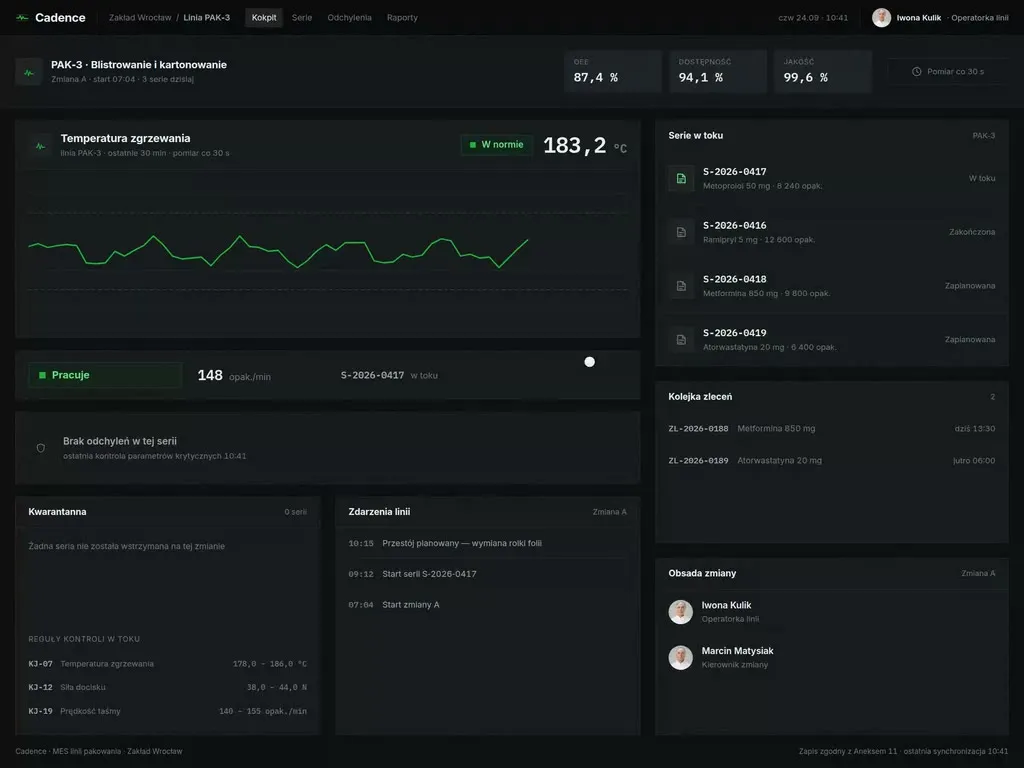
At Wzór UX agency you receive an interactive design of your gaming software, whether a LiveOps panel, an in-game store or a tournament platform, and our team or your own developers can then build it.







Challenges
What challenges do we help solve in gaming?
Our approach
We design the LiveOps panel so that a new event, before it is published, sits on the calendar next to all the others, with the same player group and end time. When two events target the same people and give the same reward, the team sees it on screen, not in Monday's data.
Scope of services
Our approach
Next to every offer in the in-game store and the web shop we put the price in złoty or euro beside the price in game currency, so players do not have to convert gems into money in their heads. We size currency packs to item prices so that no leftover remains after a purchase with nothing to spend it on.
Scope of services
Our approach
In the support panel we group post-update tickets by cause, so an agent answers the whole group with one checked reply rather than each player separately. Each group shows how many players are waiting, and that number decides which patch bug goes to the developers first.
Scope of services
Who it is for
Which gaming companies do we design software for?
-
LiveOps panels and event configuration
Free-to-play and live-service game studios, where a LiveOps manager lays out events, offers and rewards for successive player groups every week. We arrange the panel by role: the event designer prepares an event as a draft, and it is published by someone who can see the scope of the change.
-
In-game stores and web shops
Mobile game makers and publishers who sell currency and packs inside the game and in their own browser store, with a monetisation lead putting the offers together. We design the web shop so that someone arriving from a link in the app immediately sees their nickname, their currency and the same packs, because that is how they know this is the right store.
-
Tournament and esports platforms
League and tournament organisers, publishers running competitions inside their game and brands with campaigns for players, and on the other side team captains who check in before a match and report the result. We give the most care to the moment after the match: reporting the result with a screenshot, and the dispute the organiser settles on the platform rather than in private messages.
-
Companion apps
Publishers of titles whose players want to check their progress, set up a squad or look at the item market when they are away from their PC or console. We start a companion app from the one thing people come back for during the day, and we plainly label features available only once unlocked, so nobody goes looking for a locked market on their own.
-
Player support and moderation panels
Support teams at studios and publishers, where an agent spends the whole shift answering questions about accounts, purchases and penalties, and a moderator reviews reports from the in-game chat. Next to a report we show the moderator the part of the conversation it concerns and the reported player's earlier penalties, and we show the agent the purchase history beside a refund question.

Why us?
Why choose our UX agency?
-
Fewer fixes after an event goes live
An event checked in preview before publishing less often ends in compensation for players and a night spent fixing the configuration. LiveOps staff plan the week ahead instead of repairing the last one.
-
Fewer refunds and payment disputes
A player who knows before buying what they are getting and for how much is less likely to ask for a refund or file a chargeback with their bank. Finance sees it in the settlement with the payment provider.
-
Bigger tournaments with the same team
The organiser runs sign-ups, the bracket and results in one place, with no spreadsheet on the side. The same crew can then handle a bigger tournament or a new season of a league.
-
A senior team
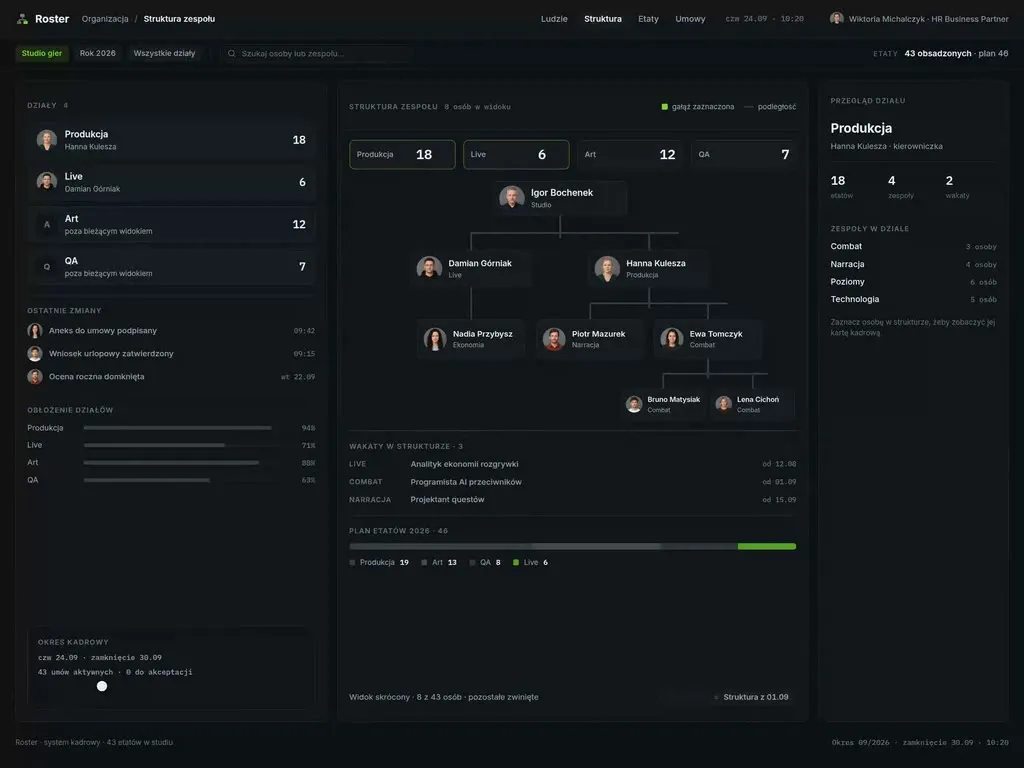
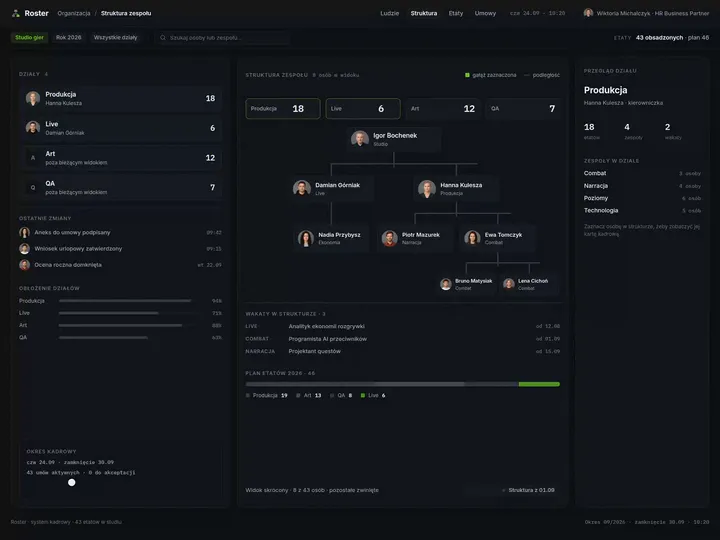
A team of senior UX designers who have been designing interfaces for nine years, today for large organisations, SaaS companies and software houses, and who prepared a design of Roster, an HR system, with game studios in mind.
-
Proven client trust
We have designed for 115 brands, and most of them come back to us with their next project.
-
Higher quality with AI
A designer with AI tools checks more variants of an event calendar or an in-game store screen than they could draw by hand and picks the one that works. What reaches you is a tested version, not the first one that came out.
Process
How will we design your gaming system, step by step?
-
A conversation with your team

We set the goals and map the systems your game lives in after launch
We sit down with the game's producer and the people responsible for LiveOps, monetisation and player support. We list the systems that an event, a purchase and a ticket pass through, pick the process to change and agree how you will know the project has worked.
Key steps
- Conversations with the producer, the LiveOps team and player support
- A review of systems: game backend, LiveOps panel, store, helpdesk, Discord
- Choosing the process to change
- Agreeing the measures: players returning after an event, refund requests, support response time
Deliverables
- Project brief
- Map of the game's systems after launch
- List of measures
- Scope of the first stage
-
Discovery at the LiveOps team's desks
We study the work where the game is run live
We sit next to the LiveOps manager during an event week, next to a support agent on update day and next to the organiser on tournament day. We test the store and the app with players, because the store and the app are judged by the people on the other side of the screen. We look for workarounds: a spreadsheet with the event calendar, a Discord channel for reporting results, a note listing reasons for penalties.
Key steps
- Observing the LiveOps team during an event week
- A shift with player support after an update
- Observing a tournament from the organiser's panel
- Interviews and tests with players
- A review of player tickets and app store reviews
Deliverables
- Research report
- Map of the team's work, showing where people work around the system
- Prioritised list of problems
-
Interactive system design
A design your team and players click through with data from your game
Your LiveOps team clicks through the panel prototype with events from last season, and players from your community do the same with the store and the app. Feedback from both sides goes back into the design before the developers take it over.
Key steps
- Screen architecture by role: LiveOps, monetisation, support, organiser, player
- Interactive design on data from your game
- Exception states: overlapping events, a declined payment, a disputed match result
- Prototype tests with the team and players
Deliverables
- Interactive design of every screen
- Component library
- Description of behaviour in exceptions
- Prototype test report
-
Build or design hand-off
The new screens reach the game together with the integrations
Our team builds the design, or we hand it over to your developers. Either way, we spell out what the panel writes to the game backend configuration, how a web shop purchase lands in the player's inventory and how the player's account connects to Discord, so that launch does not interrupt play.
Key steps
- Screen and field specification for developers
- Integration map: game backend (PlayFab, Unity Gaming Services or your own), payments, player account, helpdesk, Discord
- Support for the implementation team
- A test event and a test purchase in a staging environment before launch
Deliverables
- A working system or a package ready to build
- Integration specification
- Pre-launch test report
-
Measuring after launch
We check against game and support data whether the change worked
After launch we compare players returning after events, refund requests and support response time with the measurement taken before the change. We go through the results with your team and choose together which screen to improve before the next season.
Key steps
- Measuring players returning after events
- A review of refund requests and support tickets
- Conversations with the team after the first season
- Plan for the next improvements
Deliverables
- Measurement report
- Prioritised list of improvements
- System development plan
Methods and technologies
Platforms, standards and principles we work with in gaming
-
PlayFab
When a game runs on PlayFab, the team sets up events and offers in Game Manager, and a change to Title Data, the key-value pairs in the game's configuration, may take up to 15 minutes to refresh in the cache. We then place the LiveOps panel on top of Game Manager, with a preview of a change's effect before it is saved.
-
Unity Gaming Services
In Unity Gaming Services an event for a chosen player group is set up in Game Overrides, which suspend settings from Remote Config, Economy or Matchmaker for the duration of the event. The view we design for this shows a LiveOps manager which game settings an event replaces, and for whom.
-
Steamworks
In a game released on Steam, the player approves a purchase in the Steam overlay, and the game only learns the outcome from a callback. We prepare the store screen for both answers, approval and refusal, so that once the overlay closes it is clear what the player bought.
-
Discord
Discord is where game communities talk every day, and through its API an app can recognise a player's account and add them to a server. We set up a tournament platform's link to Discord so that sign-ups and team roles come from the platform, while the server stays a place to talk rather than a results table.
-
PEGI
PEGI marks every game with purchases with a separate descriptor, and games with paid random items submitted to PEGI from June 2026 get PEGI 16, social casino games PEGI 18. When designing an in-game store we mark the offers with random contents together with you before submission to PEGI.
-
CPC Network principles on in-game currencies
The principles of the CPC Network, the national consumer protection authorities of the EU, adopted on 21 March 2025, list a right to block an account without the possibility of contesting the reason among the terms that should not appear in a game's terms of service. So we add to the support panel a way to appeal a penalty, one that shows its reason and lets it be contested.
Selected work
Our work in related fields
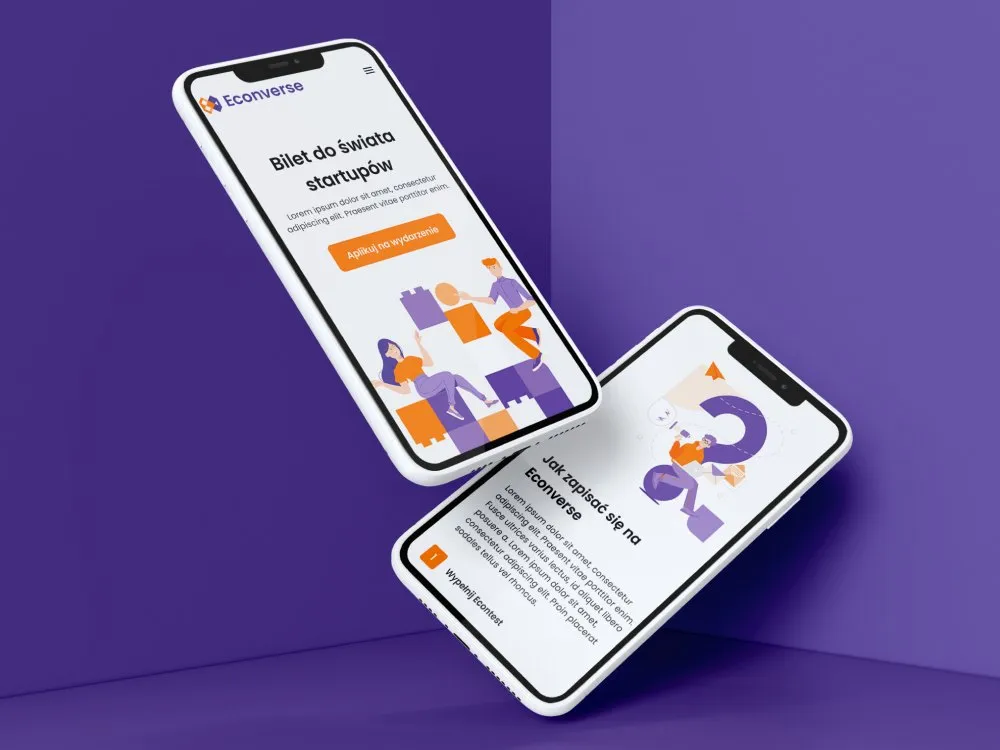
Our portfolio does not yet include a project for a gaming company. Below are a website for a start-up event and a website for internships abroad, both from education, and the identity of a radio station's anniversary campaign from the media industry. Each of these projects also has a link to entertainment.
-
Education
Econverse
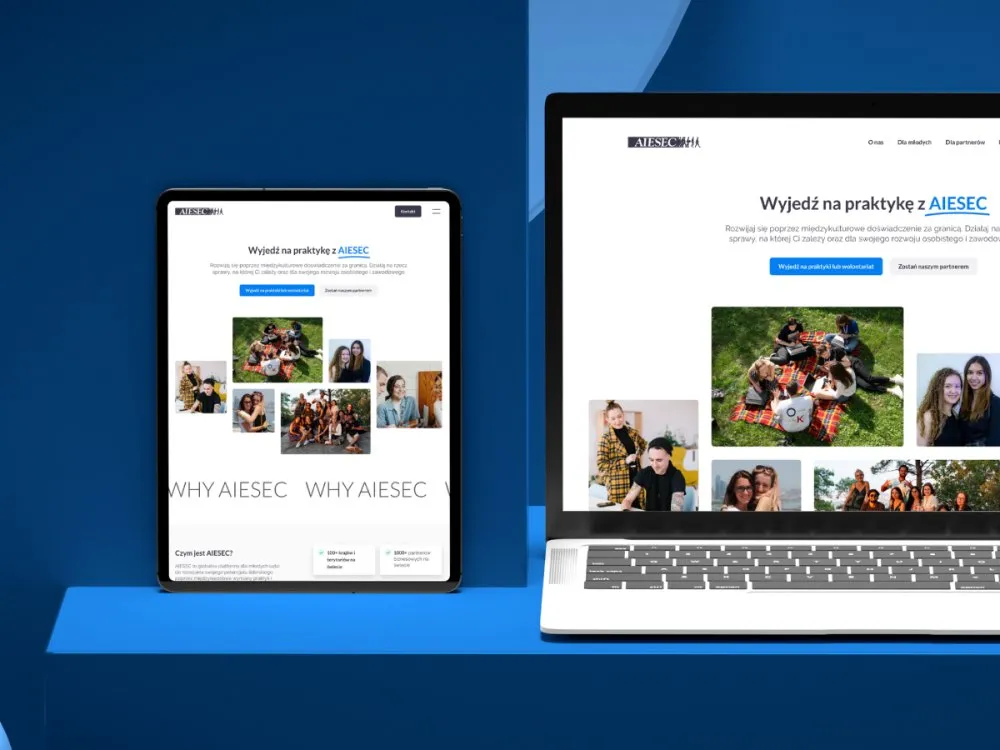
View projectThe website for the Econverse event at the PGE Narodowy stadium - a "Bilet do świata start-upów" landing page with event sign-up, sections on prizes and accommodation, an application form and subpages, in desktop and mobile views.
-
Education
AIESEC
View projectThe AIESEC website - international internships and volunteering for young people. The site serves two audiences at once: candidates looking to go abroad and companies looking to become partners. A "Why AIESEC" section, a programme finder, an application form and participant testimonials. Desktop and mobile.
-
Radio Lublin
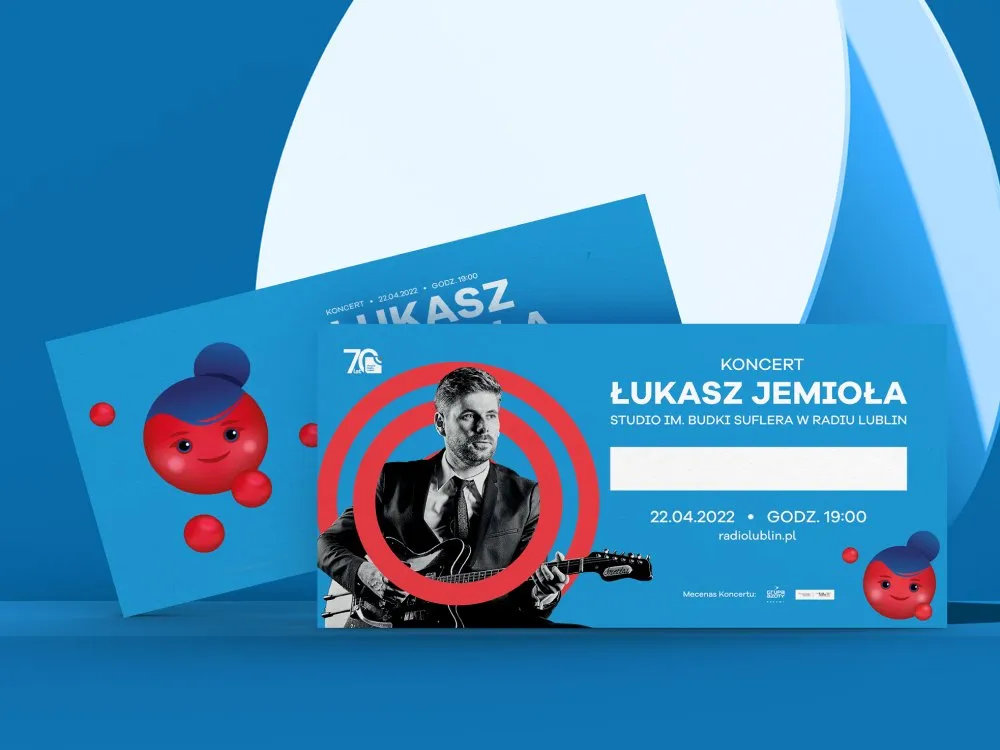
Identity for an anniversary campaign
- See what else we build Projects
Start your gaming software project
One team designs your LiveOps panel, in-game store, tournament platform or companion app, from research with players to the build.
Client voices
What our clients say
 Maja Wieloch-Silecka Operations Director, Bosfor Group

“Working with the Wzór team was a genuinely great experience! They always answered our questions quickly and were flexible about our comments. They have no shortage of creative ideas and are at the same time thoroughly reliable and on time. The end result fully met our expectations; we recommend them to anyone looking for professionals who care.”
 Piotr Alberski Chief Operating Officer, Agencja XO Media

“Our clients expect us to act fast and effectively across a very wide scope - from building a brand, through a website with a store, to running an effective sales campaign. Not an easy task, but doable when you have a tight-knit team and partners who take on challenges on the fly. For us, quality, accountability and commitment are key, and working with UX Agency Wzór gives us that 100%.”
 Mateusz Swół Chief Operating Officer, Sellace

“Our cooperation with UX Agency Wzór started with our own website. We really liked the way they work, so we decided to subcontract projects for our clients to them on a White Label basis. We loved their workflow, the way they hand projects over to our team, their documentation and their work on the design system. Now we can take on bigger risks.”




























The team
Who will design your gaming system?
-

Aleksandra Bondar
Senior UX/UI Designer
View profileHow can I help you?
“I will design the calendar in the LiveOps panel and the in-game store screen so that the effect of each decision is visible before anyone makes it.”
-

Katarzyna Adamczuk
Prezes, Analityk Biznesowy
View profileHow can I help you?
“I will map out with you where the game's configuration lives, where the store gets its prices and how a web shop purchase reaches the inventory.”
-
Patryk Korycki
CEO, Analityk Biznesowy
View profileHow can I help you?
“I will set the scope and budget, and run the build so that the new panel goes live between seasons, not in the middle of a live event.”
-

Tadek Wadas
Senior UX/UI Designer
View profileHow can I help you?
“I will test the prototype with your LiveOps team during an event week and with players from your community, and turn their feedback into a list of fixes.”
FAQ
Frequently asked questions about gaming software
What is LiveOps?
LiveOps, short for live operations, is running a game after launch: planning events, offers and rewards, changing configuration without shipping a new version and watching how players respond. The LiveOps team works in a panel where it sets up events for chosen player groups and schedules price changes. Our work on such a panel starts with the calendar, because that is where you see which events compete for the same people.
What is a companion app?
A companion app is a mobile or web app in which a player manages their account outside the game: checks progress, sets up a squad or trades items on the market. Publishers prepare one for players who want to come back to the game during the day, away from their PC or console. When designing it, the hardest part is settling what works in the app from day one and what only after it is unlocked in-game.
What is a web shop for mobile games?
A web shop is a game's store in the browser, outside the app store, where a player buys currency, packs and items and the purchase lands on their game account. Studios run one alongside the store inside the game to sell to players directly. Login matters most here: the buyer signs in with their existing account, without creating a new one.
How do you run an online esports tournament?
An online esports tournament is run on a tournament platform that handles team sign-ups, check-in before a match, the bracket and result reporting, and for bigger competitions prize payouts as well. The organiser sets the format and schedule in a panel, and players report the result after each match. When the platform connects to the game through an API, the result comes straight from the match, with no screenshots.
What is UX in games?
UX in games is designing how a player understands a game and moves around it: from the tutorial and menus to the store, notifications and the results screen. It also covers the systems around the game used by the studio team, such as the LiveOps panel, the player support panel and tournament organisers' tools. We deal mainly with those systems and with the places where play meets money and accounts.
What does PEGI 16 mean?
PEGI 16 is the age rating of the European PEGI system for games suitable from the age of 16. From June 2026 it is also given to games submitted to PEGI with paid random items, such as loot boxes or card packs, while social casino games get PEGI 18. Since then, other purchase features also affect the rating, for example offers available only for a limited time.
What is a loot box?
A loot box is a paid random item in a game: a chest, a card pack or another reward whose exact contents the player does not know before paying for it. It is bought with real money or with game currency, and its contents may be cosmetic or may change the gameplay. For such an offer we design a description of what can be won, visible before the click on "Buy".
What is in-game currency?
In-game currency is virtual money, such as gems or coins, that a player buys with real money and spends on items and services in the game. The CPC Network, the national consumer protection authorities of the EU, expects in its principles of 21 March 2025 that the price of in-game content is also shown in real money, clearly and comprehensibly. The same principles call for avoiding practices that force players to buy currency they do not want.
Can a LiveOps panel be changed without changing the game backend?
A LiveOps panel can be rebuilt without changing the game backend when the backend, like PlayFab, accepts configuration changes through an API as well as in its own panel. The new panel then writes the same settings, only with a calendar, a preview and roles. In the project we spell out which fields the panel reads and writes, so gameplay is not affected.
Related services
Services related to gaming software
You know events or the store lose players, but you do not know where.
First we will find out with your team and with players on which screen people drop off.
You are planning a new LiveOps panel, web shop or tournament platform.
We will settle what the first version has to do and for whom before anyone writes the first line of code.
You have several systems around one game, and each looks different.
We will design a shared set of components for the panel, the shop and the companion app.