



Table of contents
Picture someone arriving on your site blindfolded, handed a description of a screenshot, and asked to fill in the contact form from that. That is roughly how a browser agent works today. It takes a screenshot, guesses which rectangle is the „submit” button, clicks, takes another screenshot, checks whether anything happened. You pay for every round in tokens, and the whole chain falls apart at the first redesign.
WebMCP answers exactly that problem. And no other one.
Which is the point, because half the material circulating on LinkedIn right now sells WebMCP as „SEO for agents”. It isn’t. Visibility and execution are separate matters, and confusing them costs the most for companies that don’t need to ship anything at all.
An agent sees your site the way you see a screenshot
Start with what breaks. An agent in a browser tab works on the same interface a person does: pixels and the DOM tree. It has to infer that a field labelled „First name” wants a first name, not a full name. It has to guess whether a <select> with three options picks a department or a delivery method. Every one of those decisions is an interpretation, and interpretation is right some of the time.
The explainer puts it more briefly than my paragraph does: „Any task that a user can accomplish through a page’s UI can be turned into a tool by reusing much of the page’s existing client-side code”. A task a person can complete by clicking can be described as a tool, using code you already have.
That’s it. No magic.
What WebMCP actually is
WebMCP is a proposed browser standard that surfaces on the page as document.modelContext. Beware of older write-ups, including ones only a few months old: for a long stretch the API was called navigator.modelContext, and half the tutorials still say so. Chrome’s documentation, updated on 1 September 2026, now speaks only of document.
Through that API a page registers tools. A tool has a name, a natural-language description and an input schema in JSON Schema. The agent asks „what can you do”, gets a list, picks one and passes structured arguments. No guessing which button is the right one.
There are two ways to do it.
Declarative means two attributes on an existing HTML form: toolname and tooldescription. The browser turns the form fields into an input schema by itself, taking descriptions from labels or from the optional toolparamdescription. Chrome’s own feature entry describes this variant as one that „requires only adding attributes to existing form elements” and needs no rearchitecting. When an agent calls the tool, the browser brings the form into focus and fills the fields, and the form stays visible to the person.
Imperative means document.modelContext.registerTool() in JavaScript, with your own execute function. Here you describe not a form but an application action: search, filtering, a state change, navigation to the right step.
A WebMCP tool runs in front of the user, in their signed-in session, in their tab. The agent does not get a copy of your application inside its own window. It is a guest at your place.
That phrasing comes from Chrome’s documentation and it is worth remembering, because it captures the difference against everything you know from integrations: „Instead of your application being a guest within an agent, the agent is a guest on your platform”.
Three layers almost everyone confuses
This is where the whole knot sits. Let’s untie it once.
The first layer is reading. Crawlers, indexes, a model summarising your offer. You solve it with content structure, clean markdown and an llms.txt file. It works for every agent on the planet, including those that never open a browser. Our benchmark in competitive research, Phenomenon Studio, has precisely that: a public llms.txt and a facts page generated from it. No WebMCP at all. That isn’t neglect, it’s the right order.
The second layer is server-side MCP. A protocol connecting an agent to your backend, browser or no browser. Universal, persistent, works in the background, has SDKs in several languages.
The third layer is WebMCP. Browser only, open tab only, live session only. Chrome’s documentation calls these tools ephemeral in as many words: „WebMCP tools are ephemeral. They exist only when your page is open”.
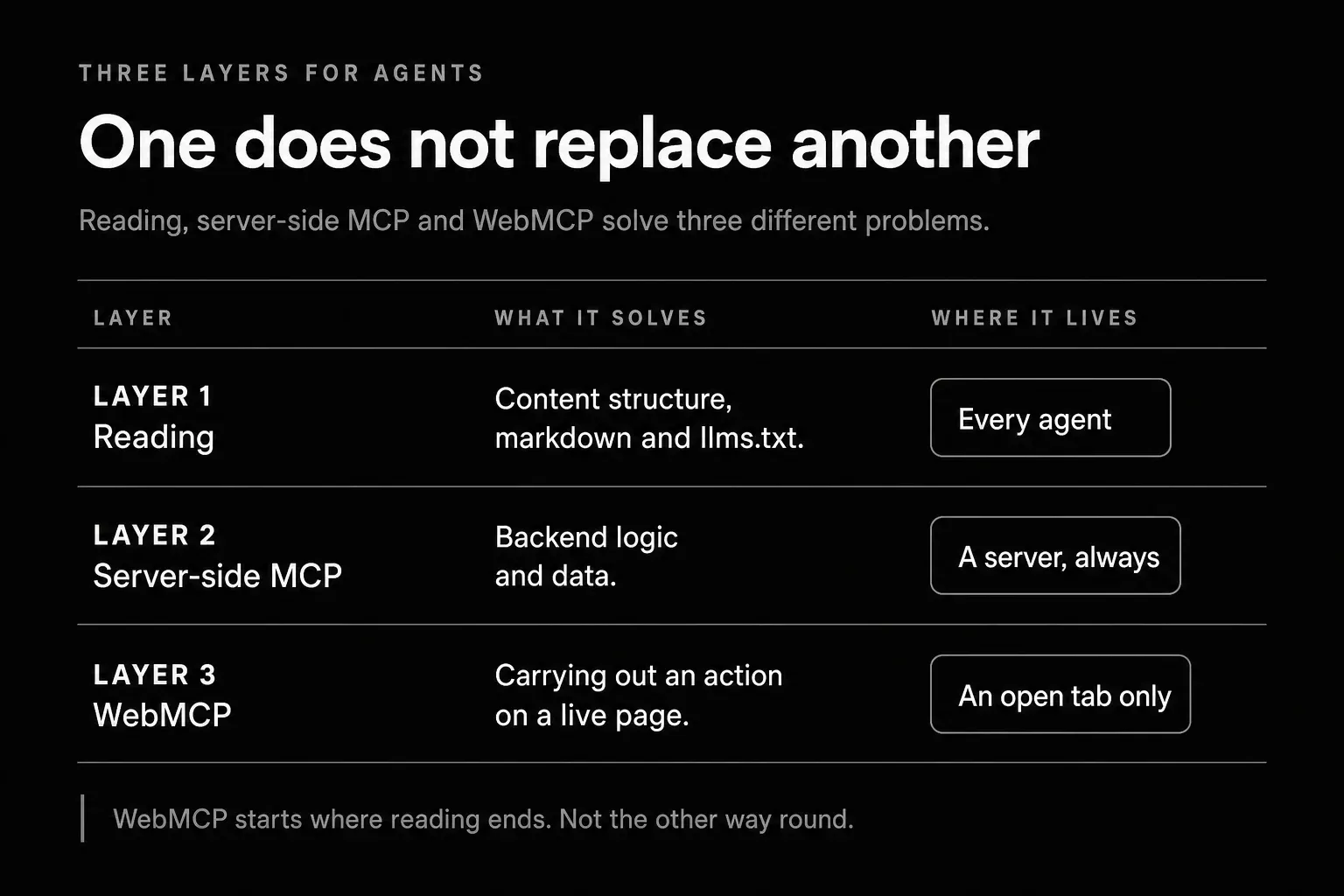 Reading, server-side MCP and WebMCP solve three different problems - and only the last one needs an open tab
One layer does not replace another. Keep the sentence from Google’s docs handy for the moment someone at your company tries to make WebMCP „cover the AI topic”: „WebMCP is not an extension or a replacement of MCP”.
Where this stands on 4 September 2026
From a distance this looks like a standard ready to ship. Up close, not really.
In Chrome’s feature entry (feature 5117755740913664) WebMCP sits at the active „Prepare to ship” stage, yet the shipping status still reads „Proposed” and is_released is false. The TAG, security and privacy reviews are pending. The dev trial started in Chrome 146 behind a flag, and the origin trial covers versions 149 through 156. Stable Chrome today is 153.0.8010.27, so we are halfway through that window, and 156 reaches the stable channel on 20 October 2026.
Firefox: „No signal”. WebKit: „No signal”. Literally those two words, with no comment.
The specification is a Draft Community Group Report dated 3 September 2026, edited by three people: one from Microsoft and two from Google. A Community Group is incubation, not the W3C recommendation track.
So who actually calls these tools today? This is the most interesting part, and it changed in August.
OpenAI launched „Site tools”, its own WebMCP implementation inside the built-in browser of the ChatGPT desktop app. ChatGPT Work and Codex discover the tools, the user sees them in a panel by the address bar, and every invocation gets a safety review. But there is a catch, and it’s a thick one: OpenAI’s documentation lists two unsupported parts of the API, and the first is the declarative API. „Tools defined through HTML form attributes aren’t available as site tools”. A form carrying toolname and tooldescription is invisible to ChatGPT. It only sees registerTool.
Cloudflare shipped a developer preview on 6 August: a dashboard switch that injects a WebMCP bridge into every page at the edge, with no change to your site’s code. Their remote browser, BrowserRun, already calls the tools.
Anthropic, meaning the Claude extension for Chrome: a request for WebMCP support sat open from March and was closed on 8 April 2026 as „not planned”, automatically, after a period of inactivity. That route does not work today.
Add Google’s Model Context Tool Inspector extension, which you use to test your own tools, and a handful of polyfill-based extensions - Google notes in the feature entry that the Chrome Web Store carries about nine such listings rated four stars or better.
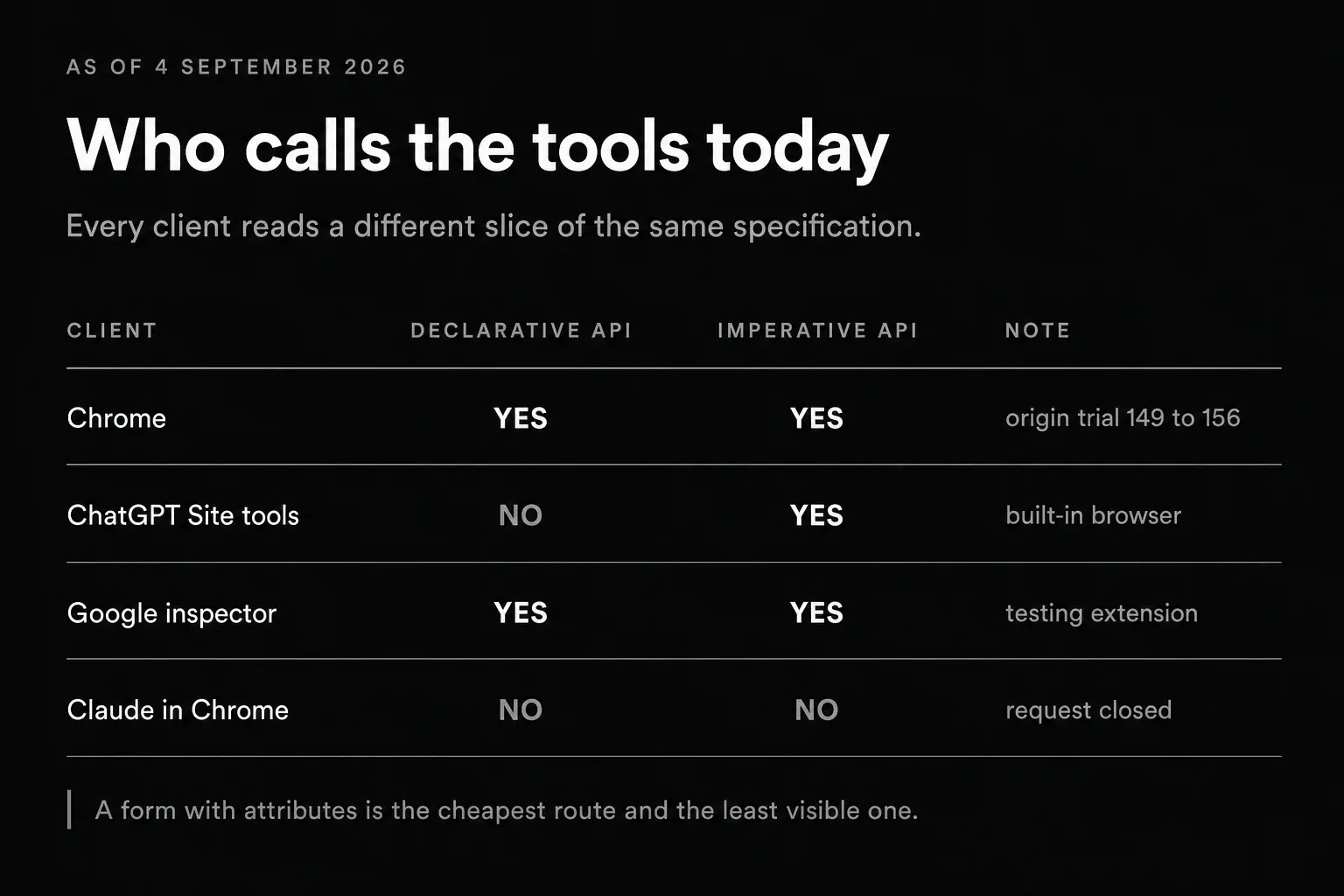 Four clients, two APIs and one conclusion: a form with attributes is the cheapest route and the fewest tools can see it
A two-question test for whether this is your problem at all
You don’t need a workshop or an audit to settle this. Two questions will do.
Does your site have an action, not just content? A cart, a booking, a configurator, filters over a thousand listings, a customer panel, a multi-step application form. Something a user does rather than reads.
Is that action guesswork for an agent today? A calendar with a custom date widget. A filter that reloads results without changing the URL. A form where you have to get a dependency between two fields right.
Two yeses and you have a real reason to start. A single no and content will pay you back better.
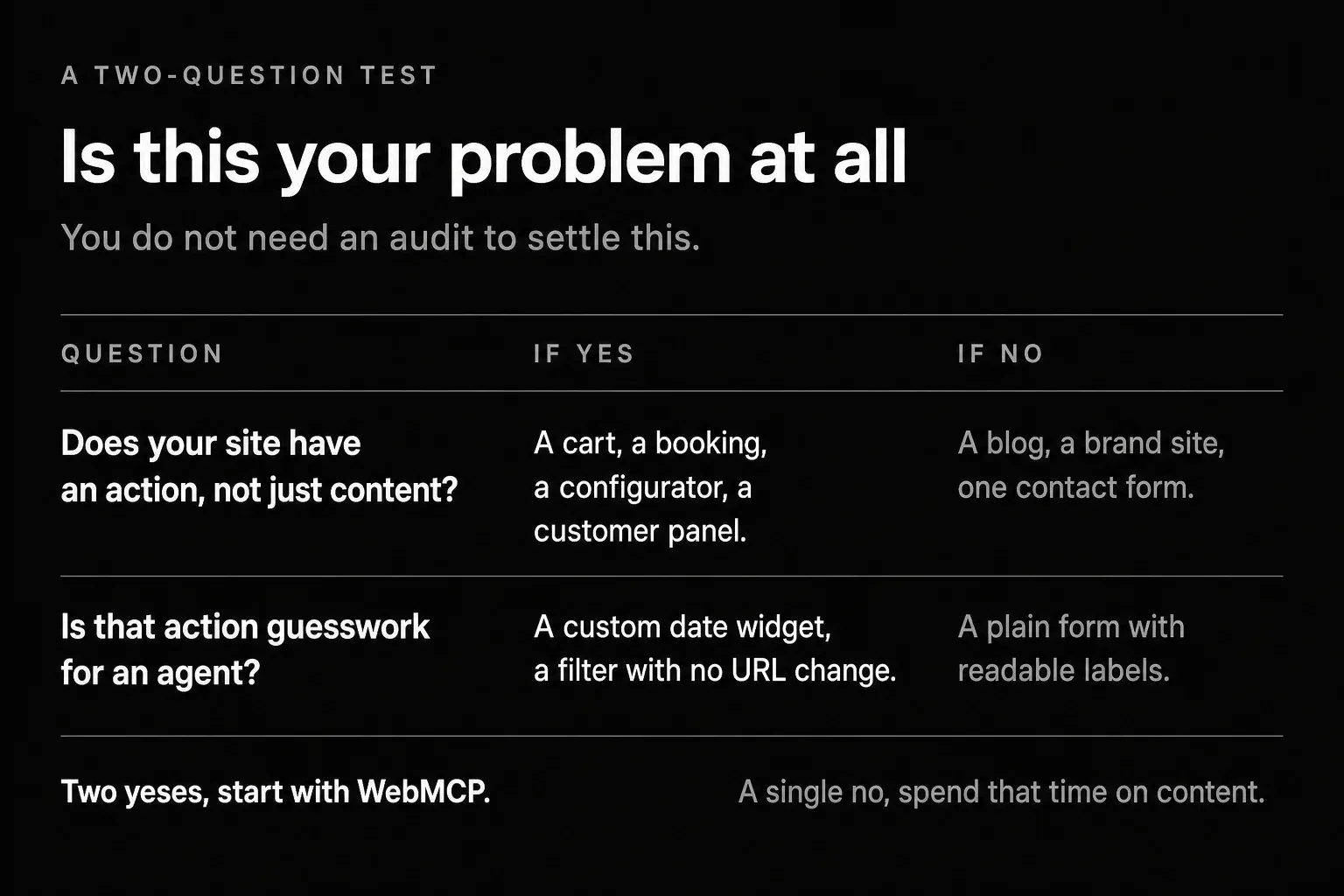 A cart and a configurator pass this test; a brand site with one contact form does not
Not worth starting with WebMCP
- A brand site whose only action is a contact form.
- A blog and knowledge base where all the value sits in text to be read.
- A landing page with one CTA pointing at an external booking system.
- An application you can only reach after logging in behind a paywall.
Worth starting with WebMCP
- A shop with filters, a cart and order history.
- A booking system where picking a slot follows its own non-obvious logic.
- A product configurator with a dozen interdependent parameters.
- A customer panel where repetitive tasks take a user a quarter of an hour.
- A listings search where the difference between a good and a bad filter is hundreds of results.
What we did on our own site and what we deliberately skipped
Our site falls squarely into the first category, so we treated WebMCP as a two-hour experiment rather than a project. Two lead forms, contact and free consultation, received toolname and tooldescription. The tool names are English and identical across both language versions: sendContactRequest and bookFreeConsultation. The descriptions are translated, because an agent reads them as a sentence and makes a decision on that basis.
Three decisions you cannot see in the code mattered most in this rollout.
First, the attributes are opt-in per page, not wired permanently into the form component. The reason is brutally practical: our contact modal lives in the base layout, meaning on every page of the site. A declarative tool registers inside a hidden form too, and on invocation the browser would try to focus that form. Registering a „contact us” tool on the pricing page is noise that spoils the agent’s choice.
Second, no toolautosubmit. That attribute submits the form with no human click. Our form passes through Turnstile and stores a lead in the CRM. An agent may fill it in completely, but a person presses the button. Full stop.
Third, in the submit event we read the agentInvoked flag and append it to the CRM note as a trace that the submission came from an agent. Purely as information. Never for authorisation, never to skip verification - because a field arriving from the browser is a claim, not proof.
We started with the declarative variant because it was the cheapest: two attributes on a form we already had. That route is open to Chrome with the flag on or an origin trial registration, and to extensions that implement the full API. It is not open to ChatGPT - its documentation says plainly that it cannot see attributes on a form. So on those same two forms, alongside toolname and tooldescription, there now stands document.modelContext.registerTool(), carrying the same tool name and the same description, so the two registrations cannot drift apart. execute fills the fields and returns a result, it never submits the form - the same human confirmation and the same Turnstile as on the declarative path. Chrome and ChatGPT reach the same tool by two different routes. Claude in Chrome reaches it by neither.
Do I regret it? Not much - with two lead forms, adding registerTool and the script that enforces the character limits on tool descriptions is an afternoon, not a sprint. But had this been an application with a cart, the same order - cheapest first, catch the gap later - would have been an expensive mistake: there, the distance between two attributes and a registerTool rebuild is measured in weeks, not an afternoon.
The order in which this pays off
Practice, to close. If you want to be useful to agents, work from the cheapest thing up.
Content and structure come first. Headings that say what a section is about. Answers to customer questions written out plainly rather than buried in a JavaScript-loaded accordion. Form field names that mean what they say. That helps people, search engines and agents at once, and costs nothing beyond editorial work.
Then a machine-readable version: markdown twins and llms.txt. Still the reading layer, still works everywhere.
Then an MCP server, but only if you have a backend with meaningful operations and clients who genuinely want to connect to it.
And only at the end WebMCP, on a real action. The declarative version as a probe, the imperative registerTool version if you want today’s ChatGPT app to see it. Start with one, the single most important user task, not fifteen tools at once - Chrome’s documentation reminds you that every tool eats part of the agent’s context window and makes its choice harder.
If you are designing an AI feature in your product right now, the interface layer has its own rules and we unpack them in the piece on UX patterns and the states of an AI feature. If your feature talks to users, the formal side comes into play too, namely the transparency duties from Article 50 of the AI Act.
And if you want to work out which actions in your product are worth exposing to agents at all, that is what we do in our AI agents service. Scope and pricing always depend on what the application does, so the simplest route is to write to us and show us the product.

Co-founder and CEO of the UX agency Wzór. For 9 years he has been running UX/UI projects for startups, software houses and large companies - from audits, research and business analysis, through product strategy, to delivery. He specialises in projects at the intersection of e-commerce, SaaS and fintech. An Interactive design practitioner - designing UX/UI directly in code.