


Table of contents
Looking for a way to stop burning more budget on graphic design work? More and more entrepreneurs and marketers have similar thoughts and, you know what? As many as 80% of them decided on a Design System. So today I’ll walk you through the most important matters connected with this solution. You’ll be able to decide whether this is exactly the system you need.
Design System - what is it?
It’s a recipe for speeding up work and reducing the cost of designing and rolling out a company’s digital products (including websites, apps and services). The system contains design principles, ready-made elements to combine, and snippets of code. No more chaos, misunderstanding and creating the same solutions over and over.
Have you heard of the Single Source of Truth (SSOT)? It’s One Source of Knowledge that everyone in the company can use. In one place, all the data needed to make important company decisions is gathered. A Design System plays the role of an SSOT in the area of design. Ready standards and components make project management much simpler and more efficient.
What’s more, although the system is dedicated mainly to digital products, the brand’s entire communication and promotion benefits from it. Social media posts, printed materials, catalogues, business presentations, billboards are just examples of places where you can freely use the system. In truth, it becomes the foundation of the company’s entire design.
Elements of a Design System
The system consists of 3 main parts: the design language, the component library and the documentation. The design language is the basis for creating components. It includes the colour scheme, typography, fonts and so on. Components, in turn, are ready-made elements built on the basis of the design language, e.g. navigation, a contact form, a footer. The documentation, meanwhile, is a guide to using the system. It defines specific principles, guidelines and definitions needed so that everyone involved in projects knows exactly what to use and where.
What exactly each of the 3 parts of the system will contain depends on the company’s needs. Remember that, as the brand develops, the system will grow. Here are the most popular elements of a Design System:
- colour scheme (colours, gradients, tones);
- typography;
- fonts;
- proportions, spacing;
- photos;
- icons;
- logos;
- buttons;
- navigation elements;
- pop-up windows;
- animations;
- tables;
- models;
- templates;
- code snippets.
Who benefits most from a Design System?
For large organisations that bring to market and develop many digital products under a single brand, this system becomes a necessity. It powerfully streamlines their work. That doesn’t at all mean smaller companies don’t need it. If you feel that, when it comes to design in your organisation, everyone has a different idea, chaos arises and the end result still doesn’t satisfy you, give a Design System serious thought.
Main benefits
- New products become more competitive thanks to optimising the time and cost of bringing them to market;
- the various specialists working on projects in the company have one clear point of reference;
- communication within the team benefits from it;
- working on projects and managing them is easier;
- new products are smoothly integrated with the image of the whole brand;
- they fit the habits and knowledge about how to operate things that users acquired while using the brand’s other products;
- the costs of design and development decrease.
What does rolling out a Design System in a company look like?
The easiest way to understand the process of creating a design system is to imagine a chemical element. Relax, we won’t dive into complicated equations. It’s enough to recall that the smallest element building all matter is the atom. An atom can’t be broken down into smaller parts. Atoms can join to form molecules, which in turn build whole organisms. What does this have to do with design? It turns out, a lot. A Design System is based on similar principles (Atomic Design).
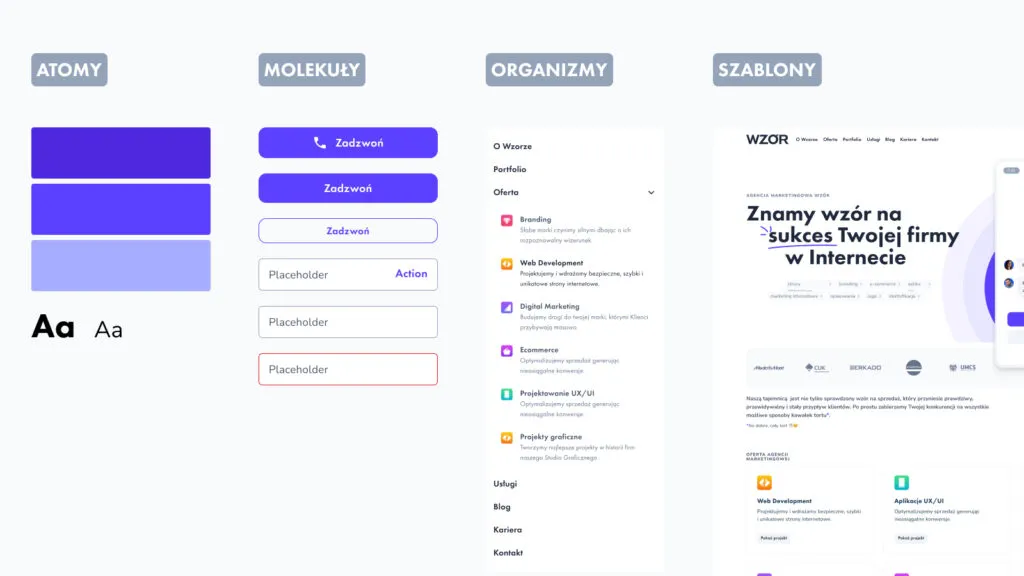 An example of a Design System built according to Atomic Design principles.
Atomic Design distinguishes 5 levels of design:
- Atoms - the smallest interface elements, e.g. font, colours, typography, proportions, spacing, photographs.
- Molecules - a simple combination of 2 or more atoms, e.g. a button with an icon, a newsletter sign-up form.
- Organisms - more complex combinations of atoms and molecules, e.g. a footer with navigation, a logo and a button; a product list; individual sections on a website.
- Templates - a combination of organisms that form a ready page layout, e.g. a wireframe.
- Pages - the final view shown to the user, together with all the graphic, textual and navigational elements.
A Design System covers the first 4 levels which, once combined, form the finished design (level 5): a website, app or service. We’ll now trace the individual stages of building the system.
Stage 1. Developing the style (atoms)
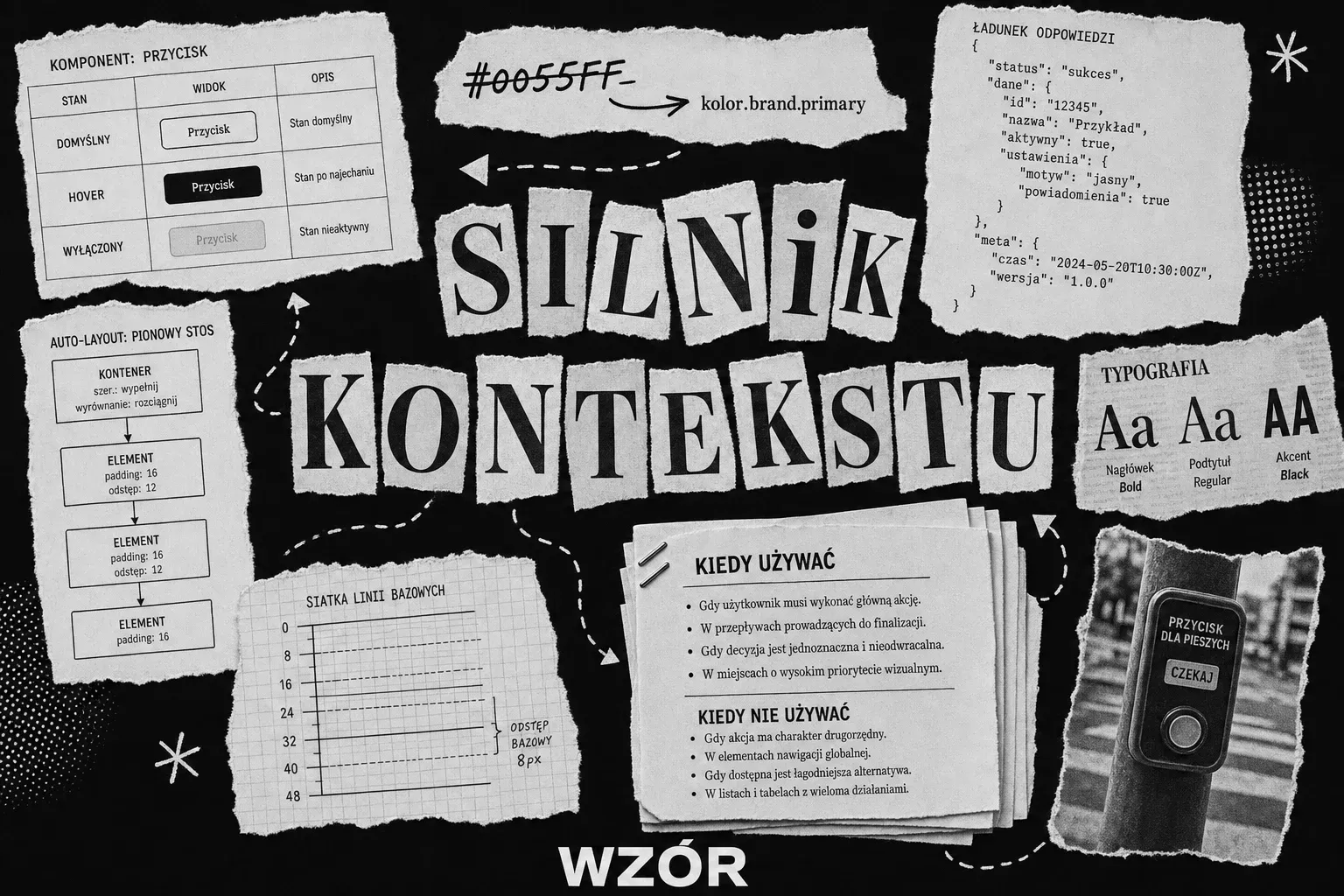
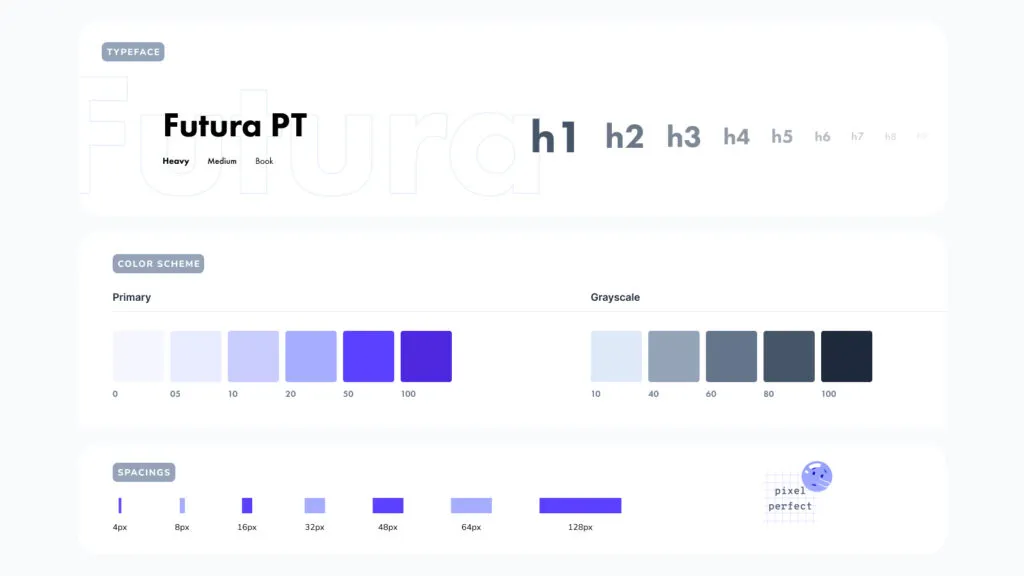 An example of atoms in the Wzór Design System.
It’s worth starting by analysing the graphic elements you already have. Check whether the colour scheme, typography, fonts, spacing, heading sizes, icons, photos and so on are consistent with one another. For example, it may turn out that you use different shades of the primary colour and it’s in no way systematised.
The task at this stage is to unify the entire style. Consider which basic elements you’re still missing. This is the place to design them.
Stage 2. Creating the component library (molecules and organisms)
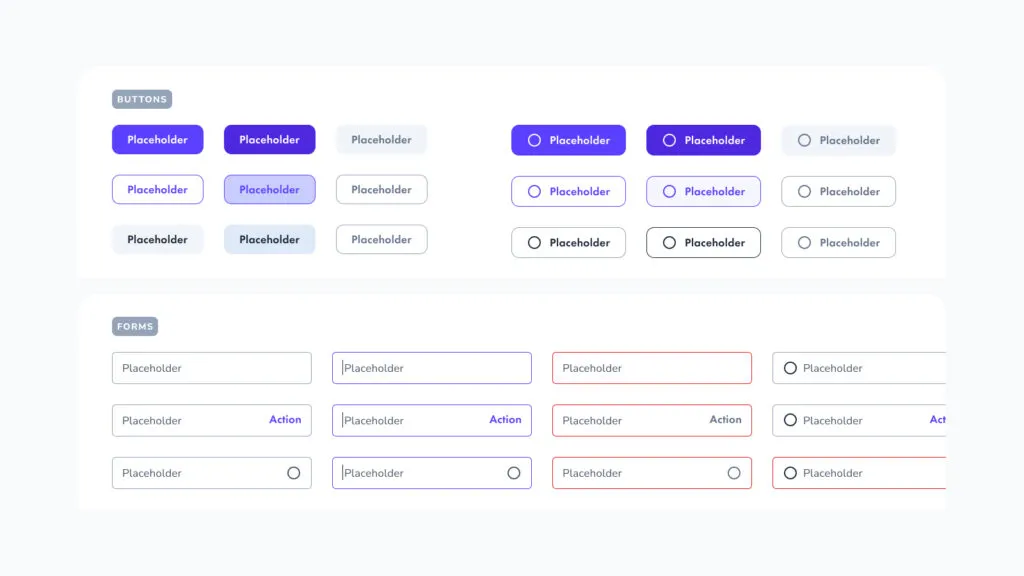 Molecules in the Wzór system.
With a base in place, you can start combining style elements into ready components. For now these will be simple combinations, i.e. a search box with a “Search” button, and the more elaborate ones, e.g. full footers, whole sections, navigation, or a product grid in an online store.
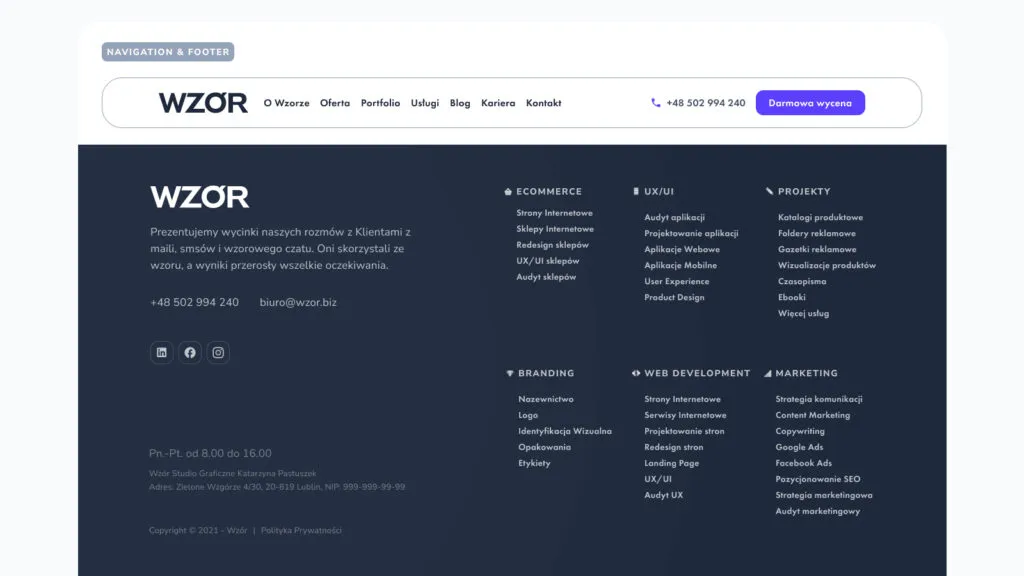 Navigation and a footer are examples of organisms - ready-to-use components.
Stage 3. Designing templates
Time to prepare templates for pages, tabs and screens. At this stage the components join together and form the ready structure of subpages. You can already see the layout which, once filled with content, will create the finished design or digital product.
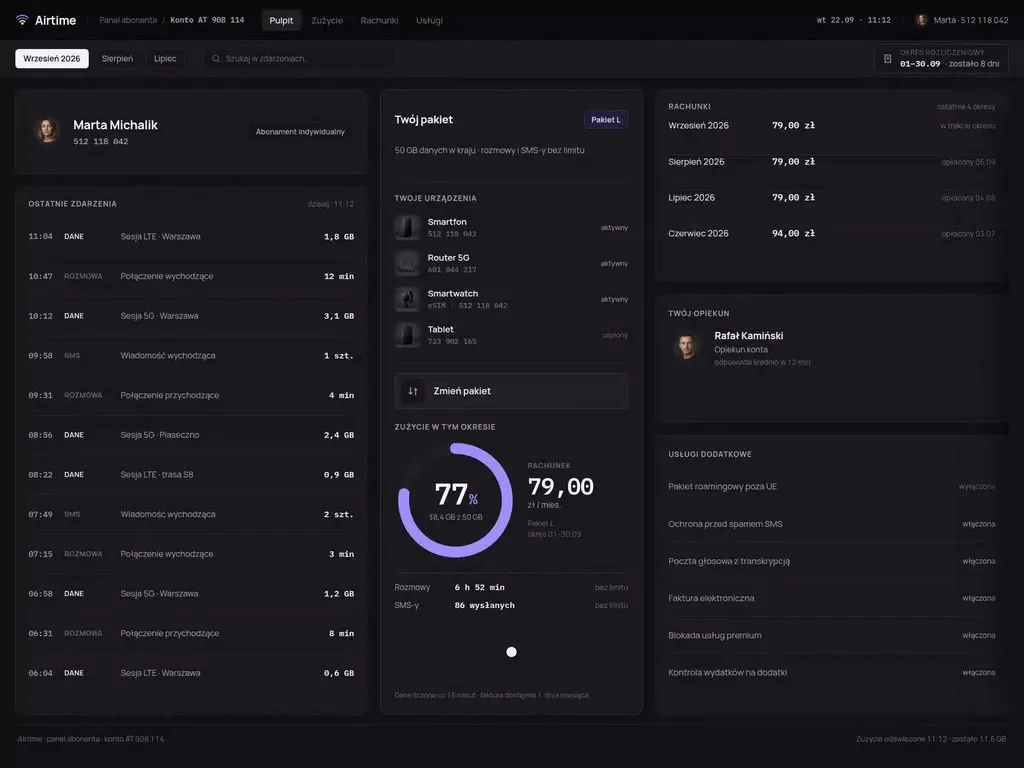
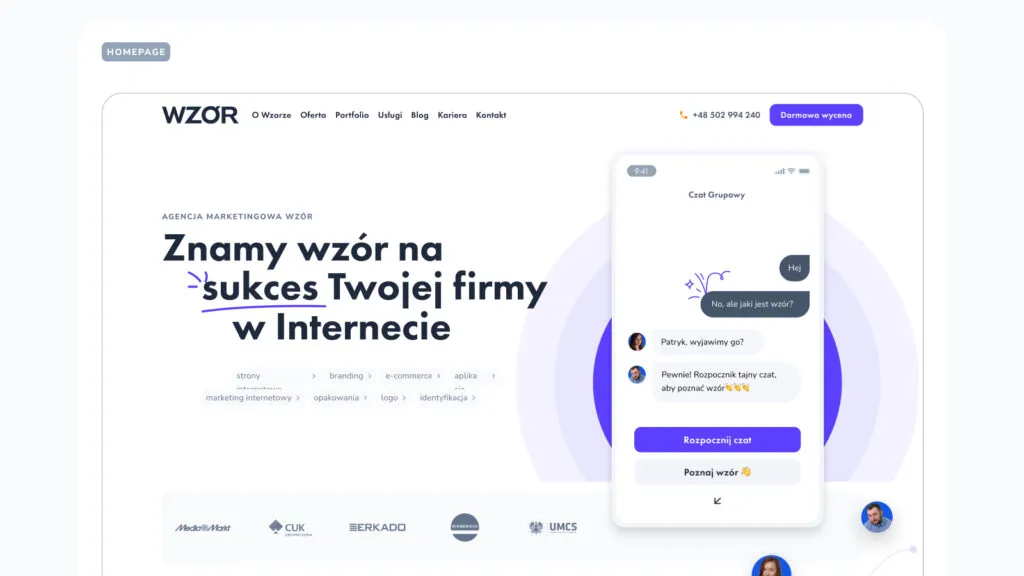 A homepage template ready for testing, from our agency.
Stage 4. QA testing
It’s worth additionally testing (with users) the elements of the created Design System. Check whether they perform their role appropriately and are understandable to audiences.
Stage 5. Formulating documentation
You can create the documentation on the fly or tackle it at the end. It contains guidelines as well as the permitted and unacceptable ways of combining individual elements with one another. The documentation also defines where to use them and explains the concepts without which the system can’t be properly understood.
Stage 6. Updates
A good design system grows together with your company. There’s no need to expand it to a huge size right away if the basic version is enough for now. However, when it turns out that your needs are growing and the system is missing some important element, add it.
The most common mistakes when creating your own system
- Failing to update the system regularly. The development of the company image, its offer and changes in customers’ expectations mean the system needs expanding and refreshing over time. If you don’t do this, it will simply become too tight for the brand and lose its power to ease your work.
- Complicated, ambiguous definitions or a lack of explanations. It’s important that the concepts used in the system are clear and understandable. You have to give definitions in every case that may raise doubts.
- Assuming everyone has the same knowledge. A developer knows completely different concepts than a web designer or a business analyst. You have to take this into account when creating the documentation.
- Gaps in the system. The most commonly omitted element is the documentation. Brands assume it isn’t needed. They forget that the possible ways of combining individual system components are so numerous that it’s easy to lose image consistency along the way.
Is it worth using the support of a UX agency?
The answer to this question depends on who exactly you have on your company team. Who has the most to offer you when creating the system? Above all, web designers, UX specialists, developers, graphic designers, illustrators and branding experts.
It’s worth calculating how much creating a Design System in-house will cost you. Estimate roughly how many work hours it will take and multiply that by the hourly rate of the people you want to involve in the process. Also bear in mind that if the team has never created a system before, it may need more time to build it than an agency. An external company also takes the load off your employees. If you choose a good agency, you can be sure you’ll get a solid system ready for immediate use.
How can you recognise a good Design System?
The process of creating a system that actually streamlines work in the company is complicated, but using it should be as simple as possible. It’s no longer a secret to you what a Design System is, what a design language is, and you now know how they’re created. All that remains is to sum up the features of a good design system.
You’ll recognise a good Design System by the fact that everyone involved in design, rolling out projects, marketing and promoting the company is able to use it without problems. So it must be very well described and clearly define how to use it. If you receive a finished system and, after familiarising yourself with it, you know exactly how to combine components and in which situations, that’s a sign the UX agency did a solid job. Good luck!

Co-founder and President of the UX agency Wzór. Business analyst - she leads interface projects for mobile, desktop and e-commerce applications, from business analysis, research and information architecture to polished UI.