






A UX audit is a document describing the UX flaws in how a website, store or app works. A UX flaw can be defined as anything that blocks business goals from being met (e.g. conversion through a contact form, sales in an online store) or makes the user experience negative. In this article you’ll learn in more detail what a UX audit is, and you’ll get to know many common UX flaws.
A simple example of UX flaws. According to research from 2017, sales in an online store are blocked by:
- extra costs added at the cart,
- the requirement to create an account,
- or a checkout process that’s too long.
This leads to cart abandonment and people leaving the store.
These are exactly the kinds of flaws described in a UX audit. If the auditor notices that extra costs are being added at the cart, they will write about it - and, more importantly, give instructions on how to eliminate those flaws from the store.
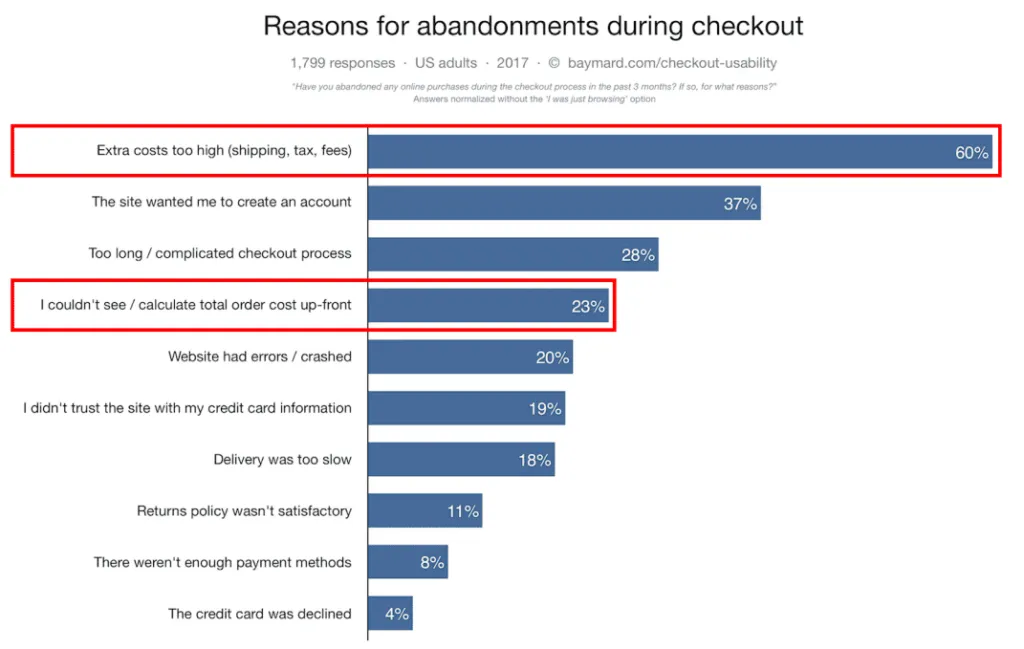 Source: baymard.com
Why are we talking about this example? Because a UX audit is not pointing out minor things like e.g. “… the button colour is wrong.” with no context. A UX audit is the act of flagging every shortcoming that will get in the way of generating profit for the company or that will frustrate users.
That’s why this topic has become fashionable now. Millions of sites, stores and apps are badly designed, and a drop in sales caused by the recession pushed people to start looking for reasons. Over our career we’ve come across UX flaws such as:
- pop-ups that couldn’t be closed,
- filters in the store that didn’t work,
- a server that was constantly overloaded and threw a 503 error,
- a page that took over 10 seconds to load,
- imprecise information, or none at all,
- and hundreds of other flaws.
These are critical examples, where users simply fled the site. It’s as if PLN 100 were already lying on the shop counter, but the assistant - while looking for the product in the storeroom - decided to take a cigarette break. The annoyed customer takes their hundred and walks out.
That’s also why the term SXO came about. It’s the use of a strategy built on growing a site’s visibility while also increasing conversion. What’s the point of bringing 10× more users to the site through SEO if they don’t convert? By working on attracting users and improving UX at the same time, you can achieve the best results.
Now you know what a UX audit is, so what’s worth remembering?
- A UX flaw can be defined as anything that blocks business goals from being met (e.g. conversion through a contact form, sales in an online store) or makes the user experience negative;
- A UX audit aims to identify flaws and solutions on the site, store or app that should improve the value of the net profit generated;
- A UX audit not only flags flaws but also gives recommendations and examples of how to fix them;
- Fixing the flaws from a UX audit should also improve the user experience;
- A UX audit should be carried out as part of SEO efforts;
What value does a UX audit bring?
When a client notices that their digital product isn’t meeting expectations and isn’t working as it should, they look for solutions - or immediately order a site redesign. Running an audit before taking any development/design action lets you save a lot of money and achieve far better results. Sometimes fixing individual flaws on the site is enough to improve conversion significantly; a completely new design isn’t necessarily required.
- A wealth of organised knowledge about User Experience
- A bulleted list of flaws that limit conversion or increase bounce rate
- Benchmarks gathered from analysing the competition
- A ready set of steps to take to improve how the product works
- Additional ideas for developing the product / brand
What are the advantages of a UX audit?
A UX audit is based on the knowledge, research and experience of UX auditors. Beyond flagging the weak elements of the product, an expert UX audit also includes:
- Examples gathered from analysing the competition
- A wealth of organised knowledge in UX / web development
- A list of steps to take when developing the product
- Ideas for the further development of the product/brand

Co-founder and CEO of the UX agency Wzór. For 9 years he has been running UX/UI projects for startups, software houses and large companies - from audits, research and business analysis, through product strategy, to delivery. He specialises in projects at the intersection of e-commerce, SaaS and fintech. An Interactive design practitioner - designing UX/UI directly in code.